Happy Friday! I’m SO excited to have a few friends of mine here today, sharing some pretty cool tips & tricks with you. Emily and Leilani from Just a Touch of Crazy are here sharing PicMonkey Tips for Halloween. These two mamas have a great blog, and I’m super thrilled they are here today. Sit back, enjoy, and I know you’ll learn some spooktacular photo tips. I can’t wait to try these out, myself!
PicMonkey has SO many fun Halloween effects. From changing your kids into the monsters they really are, to creating your own Halloween prints, they’ve got you covered.
So here are some tips for you when you’re making your own PicMonkey printable. Or even a graphic for your blog. Maybe these are some things you didn’t know. Or maybe you know them all. And more. And if so, please comment and tell us all your secrets.
Okay, here goes:
Matching the colors of your fonts. So you’ve chosen a color for your text that you love. And then you create a new text box and need to match up the same color.
Did you know you don’t have to just drag the mouse around and hope you can click on the exact same color, or that you get it close enough and maybe no one will notice.
Well, you don’t have to do it that way.
See in the picture below the numbers that are circled in the text box? That’s the number of the color.
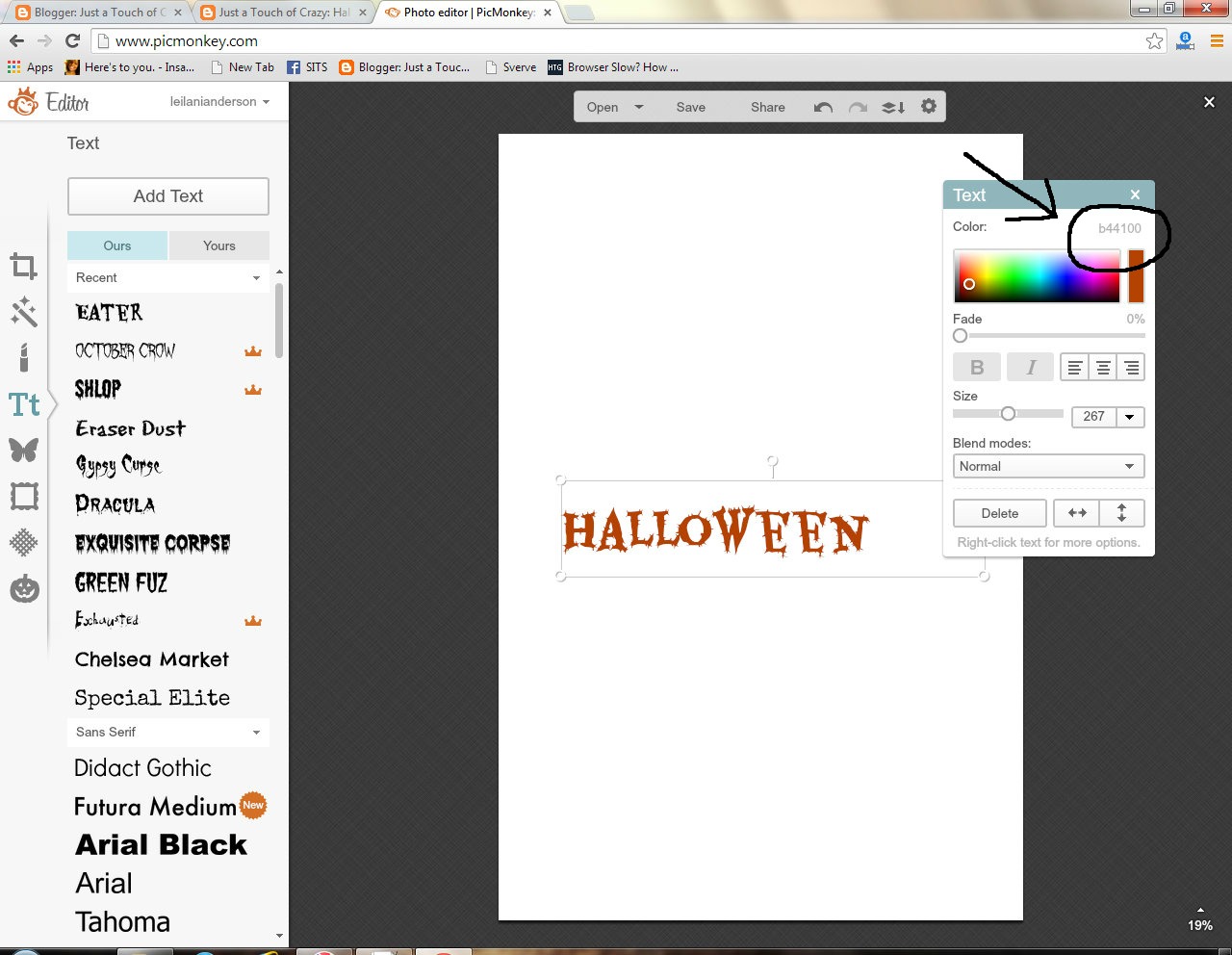
So if you wanted another text box to be that exact same color, just click right there in the text box and type in the letters/numbers of the color you want. Hit enter and yay! They’ll be same color. The same things goes for the sizes of different texts. You can type the size you want in the size box, instead of just using the little slider to change the size.
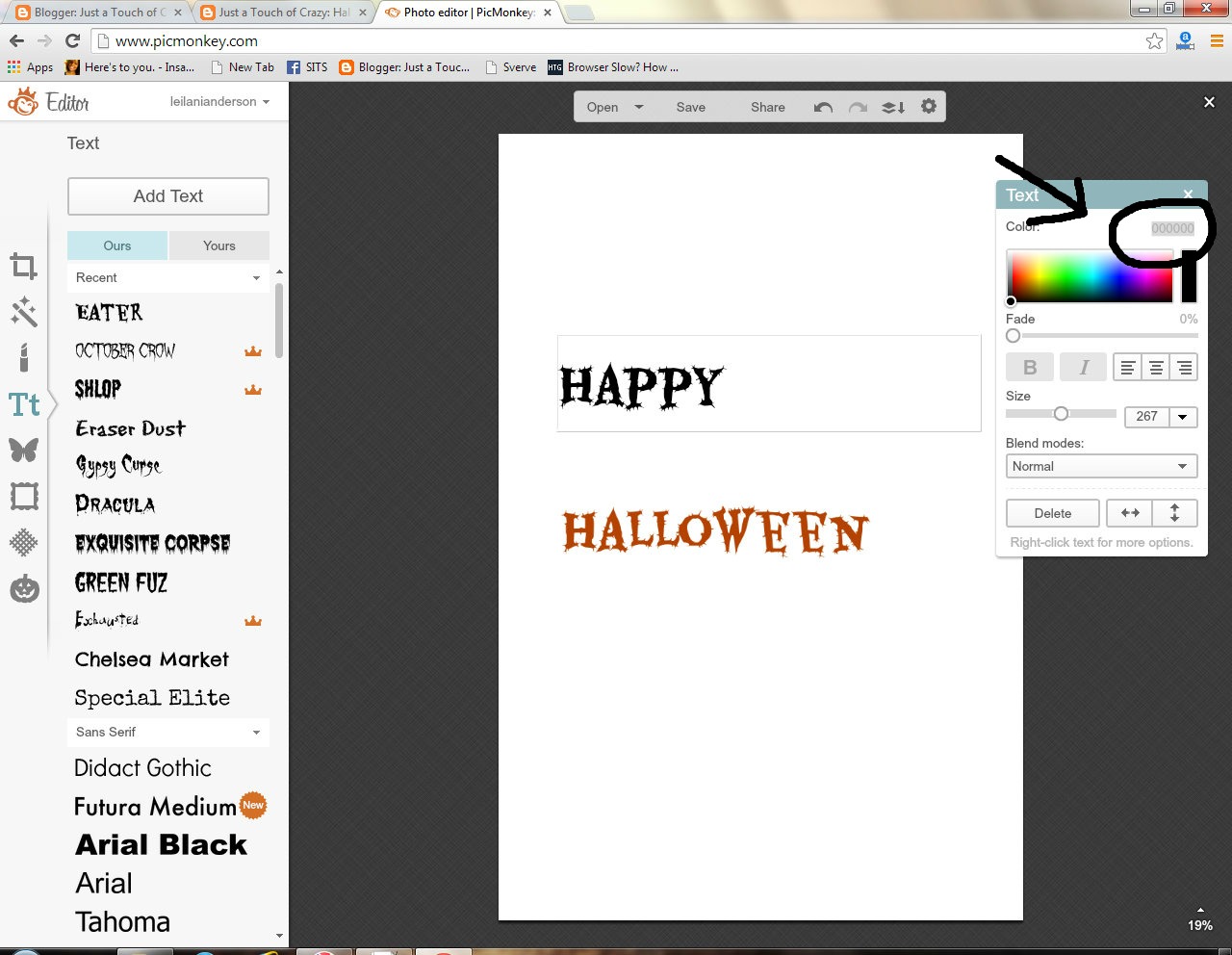
You can often find me clicking back and forth between text boxes trying to remember what the numbers are of the color I want. Although sometimes I get smart and write them down.
To get a blank white canvas to work with, you can quickly open any picture on your computer and change the canvas color to white. That’s the quickest way for me to quickly get a white canvas when I’m working on a blog graphic or a printable. I just select open, pick any random picture, and change the canvas color to white. Then you can go from there to create what you want.
This is where you can find all the Halloween effects. When you’re on the main page of the PicMonkey editing page, click on the little jack-o-lantern guy at the very bottom and you will see all these other tabs.
Each section, like vampire, zombies, etc, has effects particular to that monster AND it’s own overlays. So if you’re looking for a specific overlay that isn’t in the Trick or Treat tab, try looking in the overlays of the specific monsters. The demons sections has some pretty creepy phantoms overlays and the witches section has spiders and black cats, among other things.
Each section of monster also has it’s own fonts specific to that monster. Although they are also all on the regular text tabs, most of them towards the bottom.
One little problem I came across when I was making a Halloween print is that once you choose a “frame”, you can’t erase it like an overlay. So let’s pretend I’m making a fun print and I have the canvas color changed and a bunch of overlays and texts that I like. And then I add a frame and oh no, I don’t like it.
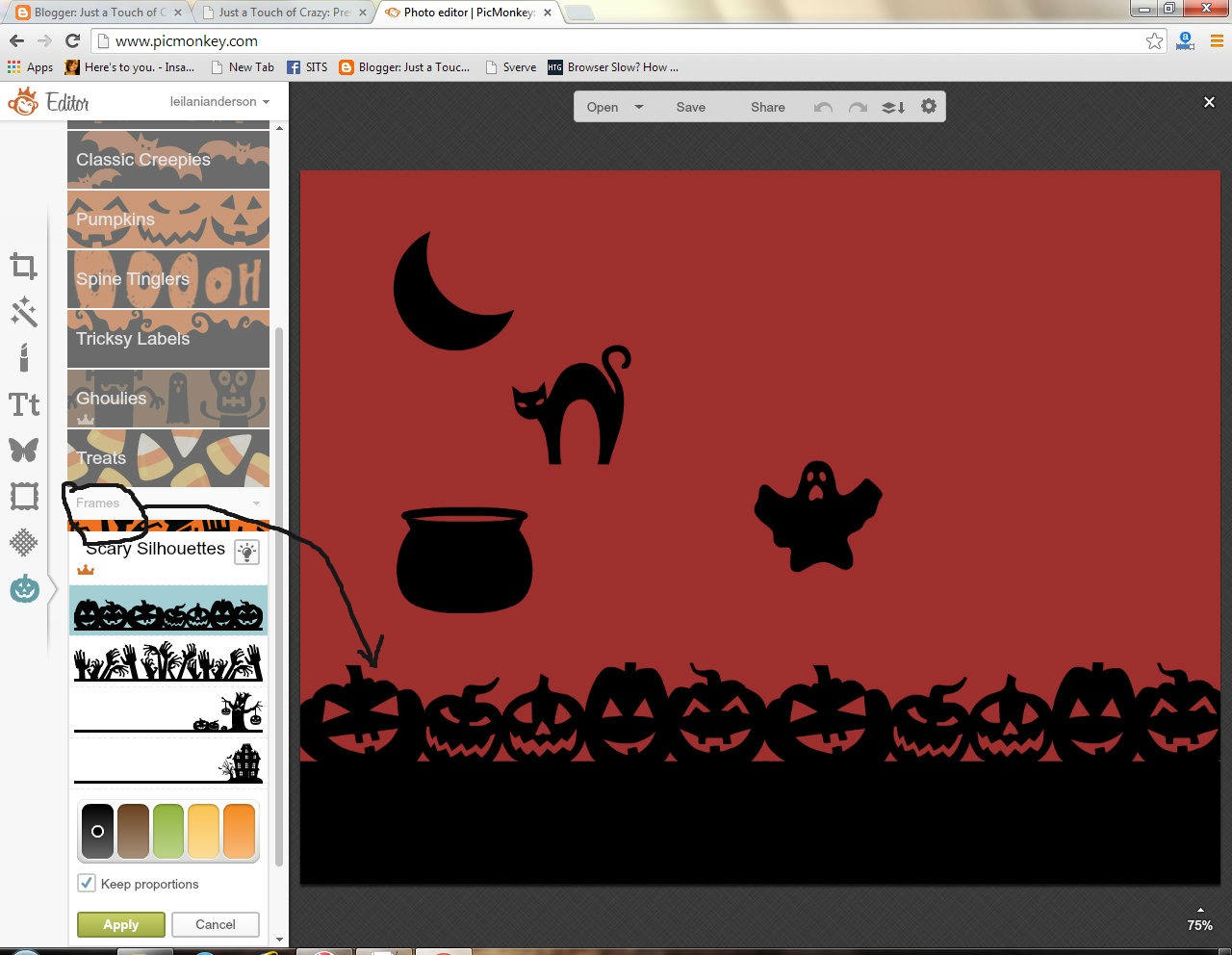
Pretend this a cute printable and I added this jack-o-lantern frame, hit apply and now I don’t like it. I can’t click it and delete it. What do I do? Start over?
No, no, no. Instead, just go back to the canvas color and change it to white.
All the overlays and text will stay, but the frame will be changed along with the color.
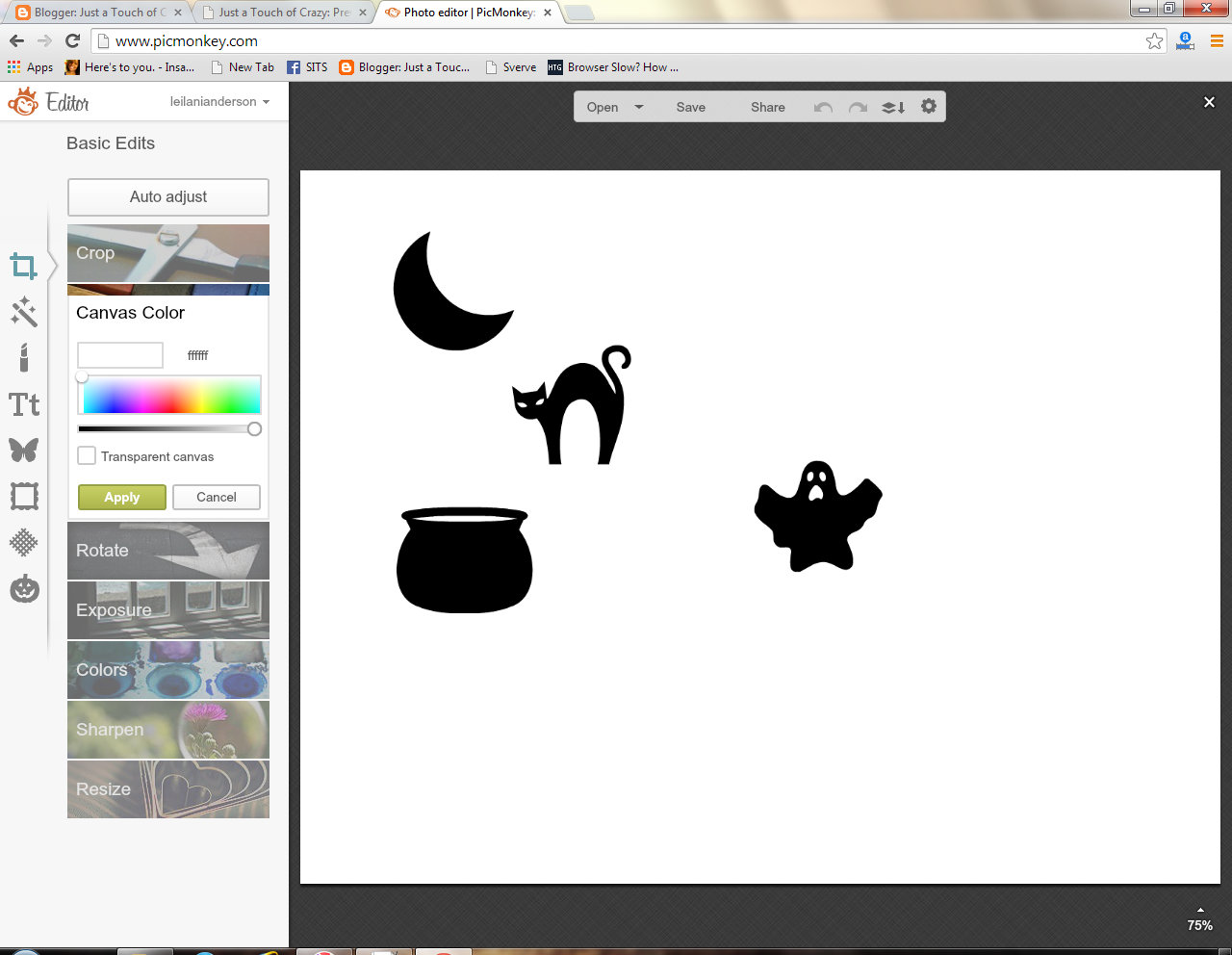
Then I can change the canvas color from white back to the color I had it.
Another thing to remember, overlays can be erased. This is great if you want to erase just some part of the overlay. Like if you’re adding vampire teeth to your sweet little baby.
And speaking of vampire babies, here’s my Little Miss as a vampire from last year.

Since I’m a Royale member, I had full access to all the features. However, there are lots of the features that are available for free. You can turn your kiddos into vampires, witches, zombies, and demons. I mean, don’t they act like monsters most of the time anyway?
Here’s JJ as a vampire. Actually he did this to himself, with my help. He LOVED it.
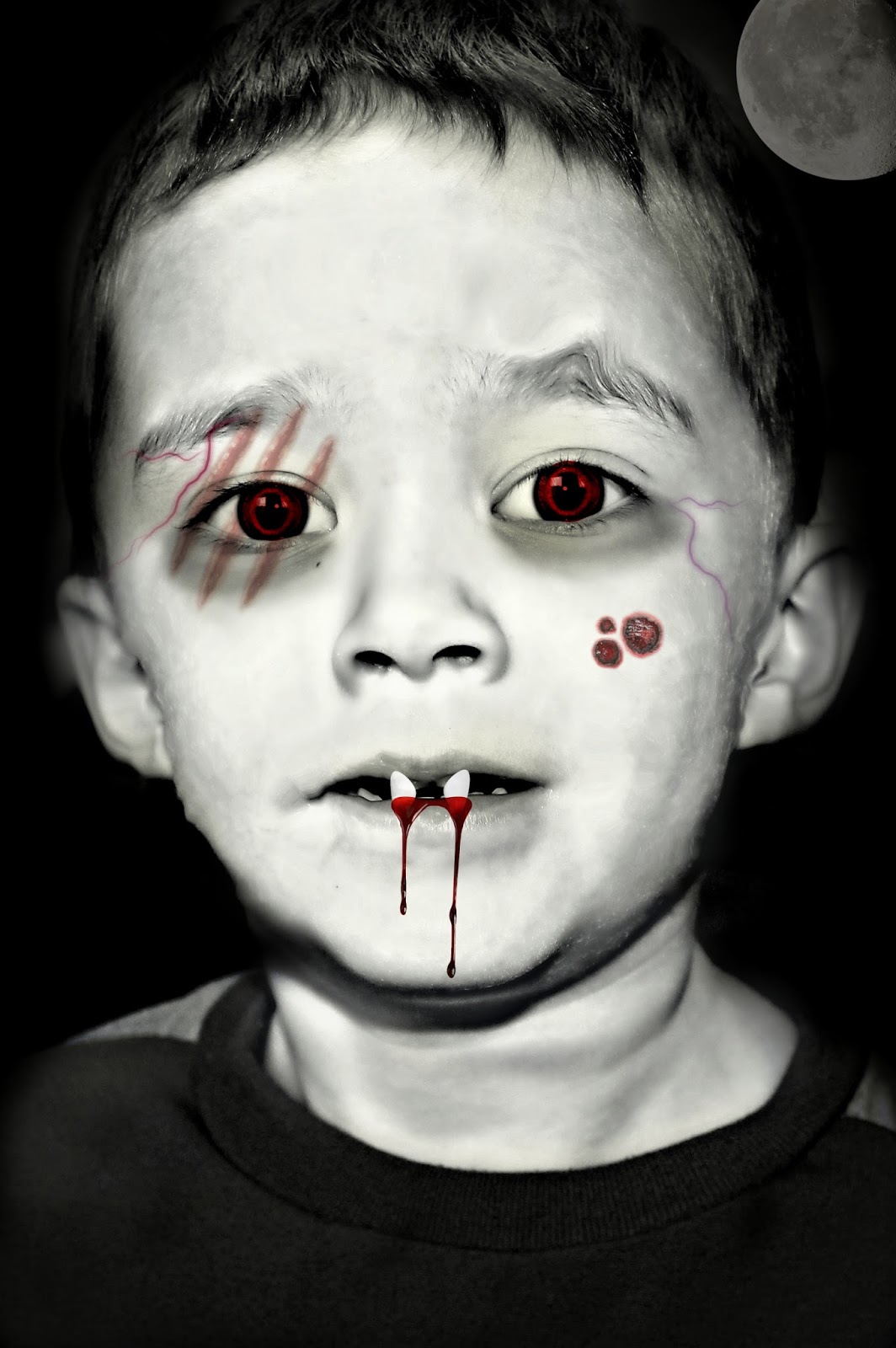
You can erase and blend and fade the overlays to your liking. The dark under eyes are kind of a like a brush that you just paint on, and so are the eye colors. Pick the color and brush it in, as if you’re painting it. The fangs, scratches, and veins are overlays. The whitening of the skin is also like a brush effect that you paint in. And you can adjust the strength.
So. What are you waiting for? Go and turn your kids into monsters. And if they know their way around a computer, let them do it with you! They can turn YOU into a monster. Or a witch. Muahahahahah!
Thanks, Heather, for letting us share your space today. We share other PicMonkey tips and all things crazy mom on our blog, Just a Touch of Crazy, so come get to know us if you want!
Just a Touch of Crazy is affiliated with PicMonkey. If you sign up for Royale using these links, we will be compensated


Fabulous Autumn/Fall/Halloween ideas….I appreciate you!!!
I love the tips Leilani and Emily shared too! PicMonkey offer some really great features, glad we could share some!
I just ADORE PicMonkey, I don’t know what I would do without it.
XOXO
Mrs. AOK recently posted…Comment on Mommy Monday #BlogHop is Live by MrsA0K2001
I’m the same way with PicMonkey, it’s a lifesaver I was so glad Just a Touch of Crazy could share these awesome tips! Thanks for popping by!
Just stopped by to Say G’day! Great tips for working with PicMonkey.
~Lorelai
Life With Lorelai
Lorelai @ Life With Lorelai recently posted…21 Mason Jar Recipes For Autumn
Hi Lorelai, thanks for stopping by from Say G’day, always such a great party too! PicMonkey is one of my favorites too, I’m glad you like the tips. I hope you have a great week!
Um, totally creepy for sure! Your editing is leaps and bounds beyond mine! Thanks for the great tips

Charlee Anne recently posted…Ramifications of Using Credit to Buy Things You Can’t Afford
Haha, I was amazed what Leilani and Emily could do with PicMonkey, I learned a few tips too! Isn’t PicMonkey such a great tool. Thanks for popping in Charlee, hope you enjoy your weekend!
Hi Heather,thank you so much for linking up with Big Autumn Bash !

Emily and Leilani, thanks for the tips- I just love pic monkey!
xx
Mila
milaslittlethings.com
milawayable@gmail.com
Mila recently posted…Fall patio update
Thanks so much for hosting Mila, looking forward to joining again this week!
Great tips! Thanks for the white canvas trick.
Natasha recently posted…Water Play: With Streamers
Hi Natasha, don’t you just love PicMonkey! Emily and Leilani shared some super great tips and trips. Thanks for stopping by, I hope you have a Happy Halloween!